Swapcard, the event platform for trade shows, associations and B2B conferences, released three updates to Sherlock, its AI agent for attendees, on 19 November 2026. You can now upload your own event files so Sherlock answers the practical questions your team usually fields, give the agent your event’s name, greeting and colour, and request Sherlock+, the upgraded tier that the file feature needs, straight from Swapcard Studio.
Sherlock answers from the files you upload
With the new Resources section, Sherlock uses documents you upload as well as your agenda, speakers and exhibitors to answer attendees. Swapcard’s examples are the answers that live in PDFs rather than in the platform, such as whether there is Wi-Fi, where the cloakroom is and where exhibitors pick up their badges. Swapcard says the result is fewer support requests for your team.
The upload screen accepts PDF, Word, PowerPoint, PNG and JPG files. Each file gets a title and an optional description, and you choose which groups Sherlock may use it with, from exhibitors, speakers, attendees and guests. An exhibitor setup guide can therefore answer exhibitors only, and speaker briefs stay with speakers. The files are not displayed in the event app, because Sherlock reads them and shares only the relevant content in its answers.
Each file shows whether it is under verification, ready or failed, so you know what Sherlock can use, and once you delete a file Sherlock stops using its content. A downloadable FAQ template in the same section gives you a starting point for the questions attendees ask most.
The agent can carry your event’s name and colours
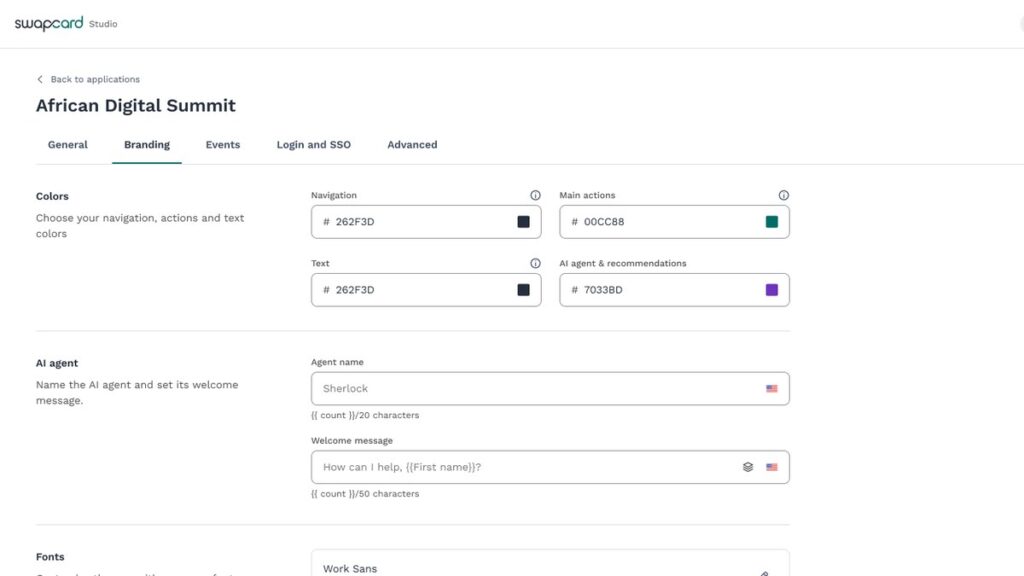
You can now rename Sherlock and set its welcome message, so attendees meet your event’s own concierge rather than a generic assistant. The agent name takes up to 20 characters and the welcome message up to 50, with a version for each event language and the attendee’s first name available as a variable. The new name appears in the agent header and above every answer in the event app, the web widget and WhatsApp, and past conversations update too.
One colour setting covers the agent and every AI recommendation in the app, including recommendation carousels and match explanations on profiles, and Swapcard generates the dark mode shades for you. If you leave the fields blank, attendees keep the name Sherlock, the default greeting and the default purple. On WhatsApp the Swapcard contact name stays the same, but the agent introduces itself by the name you choose.
Resources needs Sherlock+
Resources is one of three features, with Guests and the website Widget, that stay locked until Sherlock+ is active for your organisation. Sherlock+ is the version that can also reach guests who have not registered yet and sit on your own website. Sherlock itself stays included with every event.
In Studio, those features now carry a Sherlock+ badge, and clicking one opens a side-by-side comparison of the two versions. A Request Sherlock+ button sends the request to Swapcard’s team, who contact you to activate it, and colleagues see that a request has been sent on every event in your organisation. Once Sherlock+ is active, the locked features are ready to use on all of the organisation’s events.
To compare other event apps, see our apps and networking directory.
In the directory: Compare event ticketing and registration software in the vendor directory.