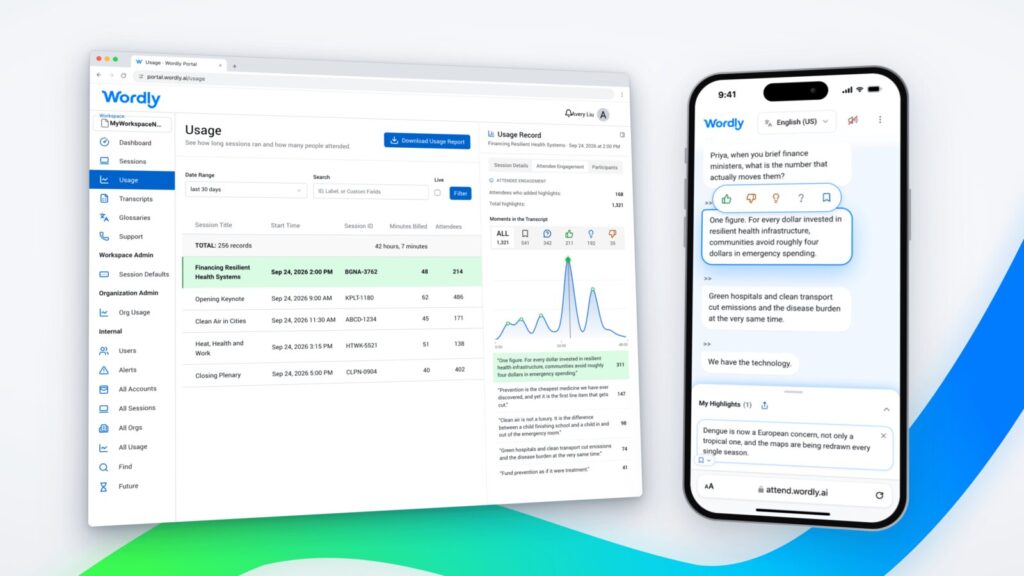
Wordly has added reactions, highlights and personal notes to the live caption feed it already gives attendees for AI translation, and shows the results to organisers session by session. The feature, called Audience Engagement, was announced on Wordly’s blog on 27 October 2026, and on 9 November the company published a fuller explanation of how it works for attendees and organisers. If you already use Wordly for translation or captions, it means the same app on attendees’ phones can now tell you which parts of a talk landed, without stopping the speaker for a poll. This report is based on Wordly’s announcement, its explainer and its product and pricing pages; we have not run a session with it ourselves.
What attendees can do
Attendees scan the event’s QR code or open a link to join the session in Wordly on their own phone, as they would to follow a talk in another language or read live captions. Wordly says there are no accounts or logins to create and no extra hardware. While the speaker talks, they can:
- pin an emoji reaction to a specific sentence in the caption stream, so the feedback is tied to exactly what was said;
- highlight lines they want to keep and add personal notes without switching to another app;
- export their highlights, session notes and a post-event summary afterwards, in any language Wordly supports.
The screenshots Wordly has published show a row of five reactions above a highlighted caption (thumbs up, thumbs down, an idea, a question and a bookmark) and a “My Highlights” panel underneath the live text.
What organisers see
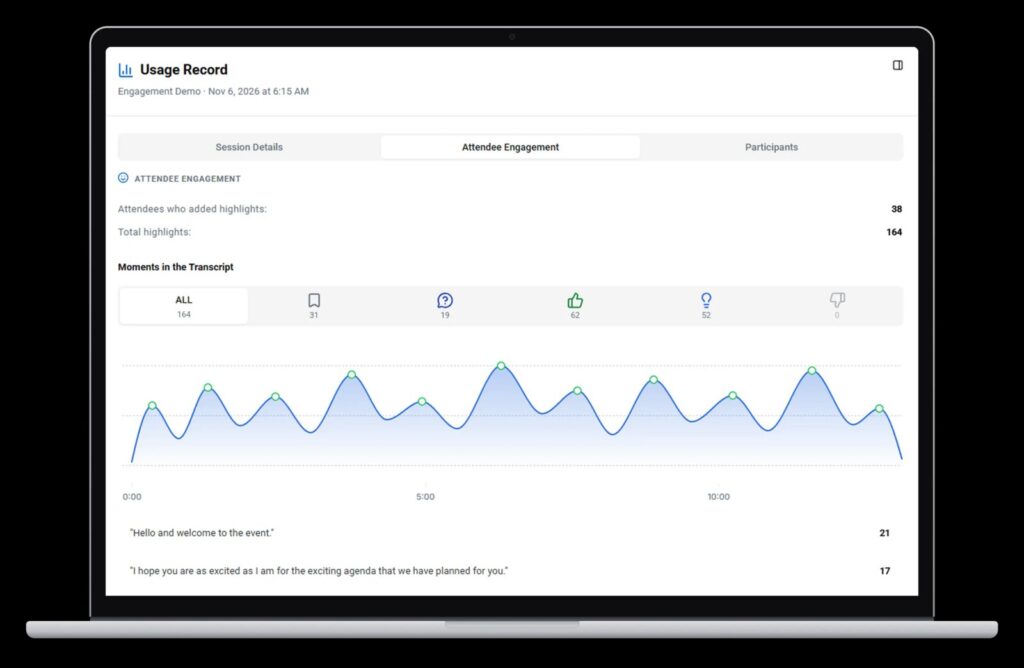
Results appear in the Wordly Portal, the same area where you already set up sessions, glossaries and access codes. Each session’s usage record gains an Attendee Engagement tab. In Wordly’s demo it shows how many attendees added highlights, the total number of highlights, a count for each reaction type, a chart of activity across the session’s timeline and the transcript lines that drew the most reactions. Wordly describes three uses for this: watching engagement as it happens, measuring sentiment across a session without interrupting the speaker, and seeing which statements, topics and quotes resonated.
The practical value is in the link between a reaction and a sentence. A post-event survey gives you an average score for a session. A reaction chart tied to the transcript can show you, for example, that the room responded to the case study and went quiet during the product slides. That is more useful for coaching speakers, comparing sessions when you plan next year’s agenda and giving sponsors something concrete after a sponsored session. Wordly also suggests using the most-reacted quotes in event recaps and social posts.
Multilingual audiences get the same voice
Because reactions sit in the translation stream, someone following a keynote in Japanese or Portuguese reacts to the same sentences as someone reading English captions. Most live polling and Q&A tools assume the audience reads the presenter’s language. For international congresses, association meetings and corporate events with mixed-language audiences, that is the main difference from bolting on a separate engagement app.
What it does not tell you
There are limits worth knowing before you promise sponsors engagement reports. The data only covers attendees who open Wordly during the session, so a room where most people do not need translation or captions may produce thin numbers. Wordly’s answer is that every attendee now has a reason to open the app, for note-taking if nothing else, but that depends on how well you promote it on screen and in your event app. A reaction is also a light signal: it shows a moment caught attention, not why.
Wordly says its app is free for attendees and does not collect or share personal information, and that the platform is ISO 27001 certified and SOC 2 Type II compliant. Because attendees do not log in, you get aggregate session data rather than a record of which named delegate reacted to what. That makes data protection simpler, but it will not feed lead scoring in the way a lead retrieval tool or an event app with logged-in profiles can.
How it is priced
Wordly’s pricing page lists Audience Engagement as an optional extra, alongside Silent Theater (live audio to attendees’ phones) and Sponsor Logos (partner branding on the caption feed), which Wordly launched shortly before it. No separate price is published for any of the three. Wordly’s core pricing starts at about $1,500 for a 10-hour package that can be used over 12 months, and Wordly says customers should contact their representative to switch Audience Engagement on. Ask whether it is charged per session, per hour or as a flat add-on before you build it into a sponsorship package.
In the directory: Compare AI event management and data tools in the vendor directory.
How it compares with dedicated audience tools
If live interaction is your main goal, a dedicated audience participation tool still does more. Slido, Mentimeter, Vevox and Pigeonhole Live run polls, quizzes, word clouds and moderated Q&A that the presenter shows on screen and responds to. Wordly’s feature is quieter: nothing appears on stage, and the audience reacts in the background while reading captions. The two can sit side by side, with a polling tool for planned interaction and Wordly’s reactions for continuous feedback on the talk itself.
Among translation tools, Interprefy and KUDO also deliver AI and human interpretation to attendees’ phones, so if you are comparing them, ask each what it offers for audience feedback and session analytics. Our Wordly profile has its plans, integrations and current pricing, and our guide to assessing AI claims in event technology covers the questions to ask about any AI feature before you buy.
Sources: wordly.ai (launch announcement, 27 October 2026), wordly.ai (how it works, 9 November 2026), wordly.ai (Audience Engagement page), wordly.ai (pricing)
Companies in this story
- WordlyYou can give attendees live captions and translated audio on their own phones, with no interpreters, booths or rented headsets, from about $1,500 for a 10-hour package.
- SlidoYou get questions from the floor and from remote viewers in one moderated queue, plus live polls, quizzes and analytics, and participants join without downloading an app or creating an account.
- MentimeterYou get live polls, quizzes and Q&A your attendees answer from their phones with no app or account, plus Menti Form for post-event feedback and one-month conference plans from £290.
- VevoxYou get live polls, questions, quizzes and surveys through a browser, with anonymous responses and results on screen, plus a free plan for 100 simultaneous participants and one-time event licences from £145.
- Pigeonhole LiveYou can run moderated Q&A, polls and quizzes for up to 100 people free, or from $13 USD a month billed yearly, with attendees joining from their own phones and no app to install.
- InterprefyYou add interpreters, AI speech translation and live captions in 80+ AI languages to in-person, hybrid or online events without building booths, with quotes priced by hour, day or 12-month plan.
- KUDOGive delegates live translated audio or captions on their own phones, with AI in 70+ languages or 12,000 human interpreters covering 200+ spoken and sign languages, and no booths or receivers.