If you exhibit at or run an event on Swapcard, exhibitor team admins can now accept, assign or decline an incoming meeting request straight from its notification. Swapcard released the change on 24 November 2026, together with registration forms that pre-fill returning attendees’ Community answers, and on 26 November it announced a stricter rule for when a meeting with several participants counts as confirmed.
Exhibitor admins can act on a request from the notification
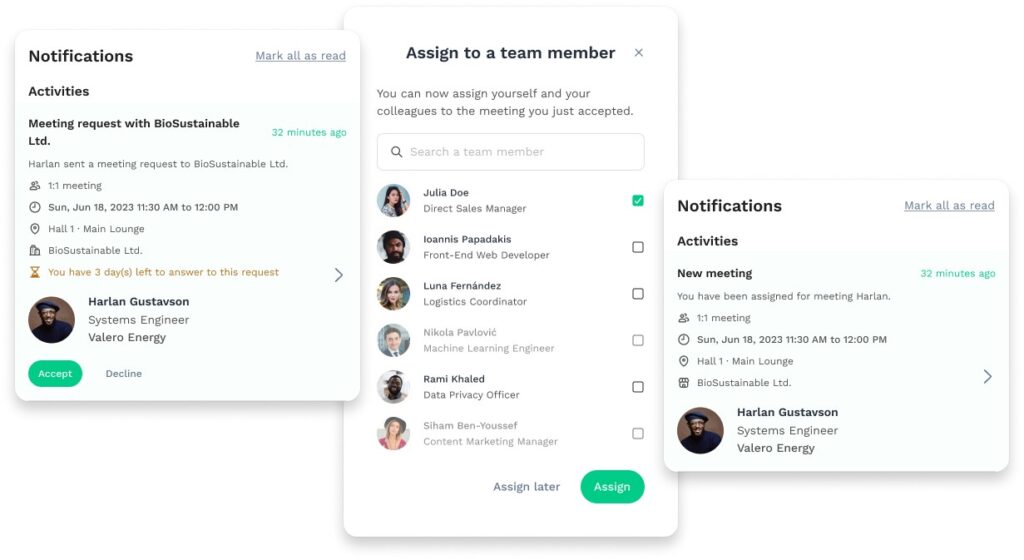
An unassigned meeting request now sends the exhibitor admin a notification showing who asked for the meeting. Accept opens an assignment window, a modal on the web and a bottom sheet on mobile, with the admin ticked at the top of the list by default and any team member who has a scheduling conflict marked as unavailable. The admin can pick one or more representatives, who then receive a new meeting activity and a push notification, and the admin gets a confirmation showing who was assigned.
Decline turns the request down at once and tells the relevant participants. In a one-to-one meeting both the organiser and the participant get the declined activity, and in a meeting with more people only the organiser is notified. Assign Later, or closing the window, leaves the meeting unassigned with a follow-up activity and an Assign button, so the request stays in view. The flow works the same way on web and mobile.
Swapcard suggests telling exhibitor admins about the change before the event opens and asking them to check their team list and availability settings in advance, because the assignment window reads that data in real time.
Returning attendees see their saved answers on the form
Swapcard registration forms already filled in basic details such as name, job title and company for attendees logged in with a Community profile. They now also fill in matching Community Custom Fields, across every field type, with the answers stored in that profile. Attendees can change any pre-filled answer before they submit, and a changed answer updates their Community profile too. Later profile edits do not alter answers already submitted for a registration.
Pre-filling only works for logged-in attendees with an existing Community profile. When one buyer registers several people in a single order, only the buyer’s own form is filled in, and a stored answer that is no longer a valid option or fails the field’s validation rules is left empty.
Group meetings will confirm only when the other company accepts
Swapcard labels the third change as coming soon. A meeting with several participants will count as confirmed only when someone from outside your company accepts it, so three colleagues from one stand accepting will no longer make a meeting look settled while the attendee has not replied. Swapcard treats participants as colleagues when they belong to the same exhibitor or share an email domain, with personal domains such as gmail.com left out, which is why it asks organisers to add stand staff as members of their exhibitor.
Until someone from the other company answers, the meeting shows as pending, and it shows as declined if that person declines. The same status appears in My Schedule, My Meetings, meeting details and notifications in the event app, in Team’s Meetings in the Exhibitor Center and in All Meetings in Studio. One-to-one meetings still confirm as soon as both people accept, and a meeting made up only of colleagues needs two acceptances.
To compare other event apps, see our apps and networking directory.
In the directory: Compare event ticketing and registration software in the vendor directory.